
“Am I spending way too much?”
This is one of the biggest problems businesses face when running Google Ads. After all, if you’re bidding on highly competitive keywords, you could be paying over $500 per click!
Thankfully, you don’t have to blow your bank account. Google Ads pricing comes down to predictable things like competition, keyword demand, and how relevant your ads are to the people searching.
Today, we’ll answer, “How much do Google Ads cost?” and how to make sure the clicks you pay for bring you business. Let’s go!
Are Google Ads Really Worth the Investment?
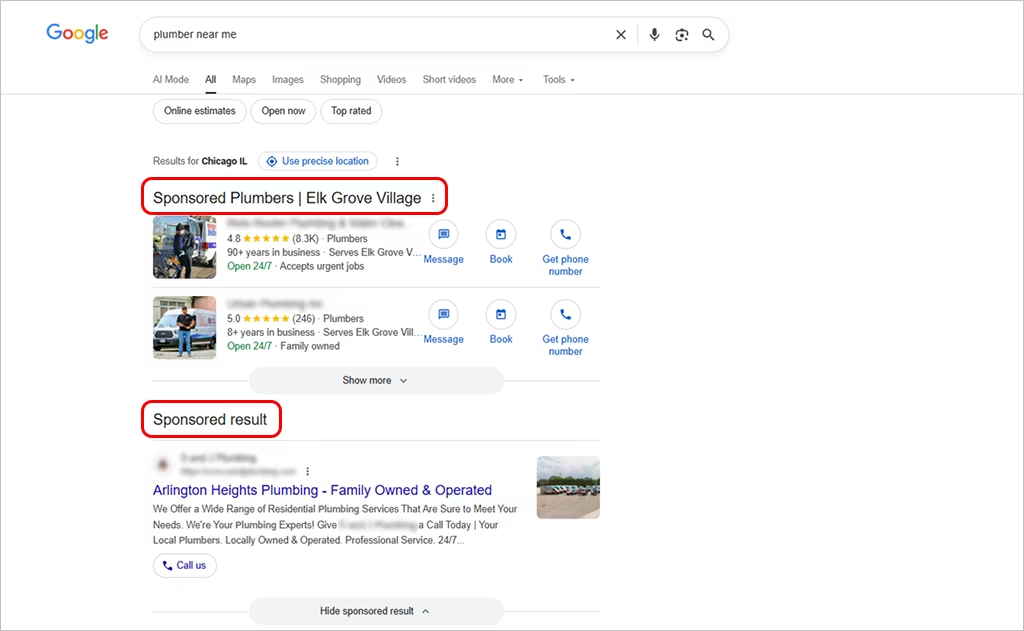
Google Ads is a pay-per-click advertising platform that puts your business in front of people who are actively searching for what you sell, whether that’s through:
- The Google Search Network (your ads appear directly on Google’s search page), OR
- The Google Display Network (your ads appear on websites your audience is browsing).
Your ad doesn’t interrupt someone’s day; it appears at the exact moment they’re considering a purchase.
So… are Google Ads worth the investment? Absolutely — as long as you manage them wisely. You must control your budget and set who sees your ads.
When optimized correctly, Google Ads deliver fast exposure, a steady pipeline of leads, and a potential return on investment up to 200%!
Stretch Your Google Ads Budget Further
Most businesses waste 30–50% of their ad spend. Stop letting your budget leak.
What Influences the Cost of Google Ads?
Google Ads pricing swings constantly. Your CPC (cost per click) can rise or fall depending on keyword demand, competition in your industry, and how well your ads perform.
Let’s break down the 5 main factors to address: “How much do Google Ads cost?”
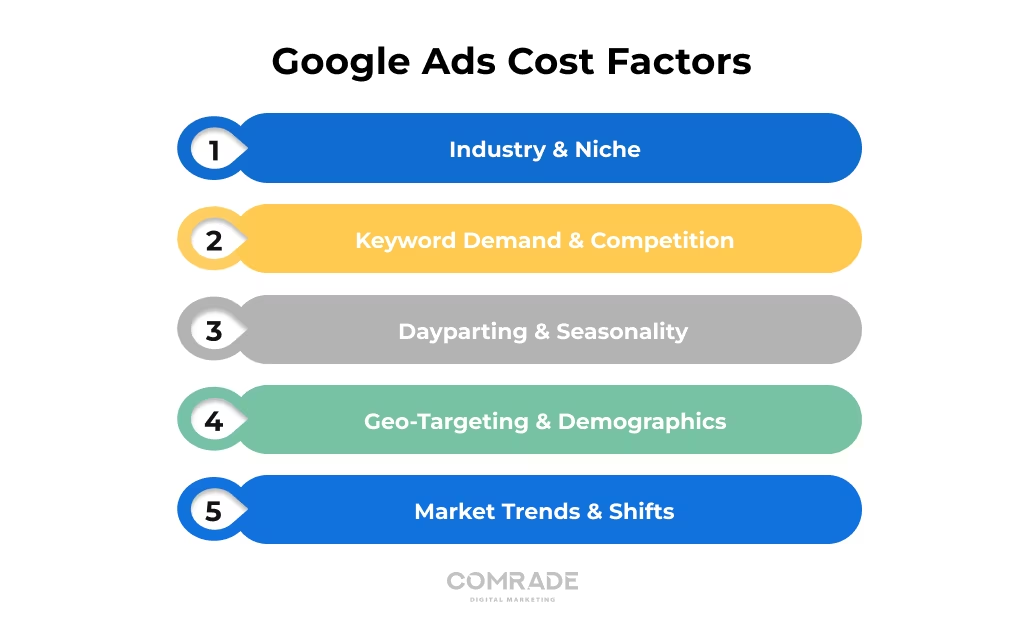
1. Your Industry and Market Niche
Your industry plays a major role in what you’ll pay for clicks.
The more competitive and valuable the lead, the higher the cost per click. For instance, finance and legal service keywords often reach $50–$100+ per click, because dozens of firms are battling for clients.
However, the payback is big, too! One personal injury case could be worth $100,000+, more than making up for several months of your marketing spend.
Pro Tip: Instead of broad keywords like “lawyer,” targeting niche, relevant keywords such as “Milwaukee personal injury attorney for DUIs”, can help you pay less per click while attracting better-fit leads.
2. Keyword Demand & Competition
The more people search for a keyword, the more businesses compete for it. This massively drives up the cost per click!
You’ll especially notice this for short-tail keywords like “car insurance” or “personal injury lawyer.”
Long-tail keywords like “affordable car insurance in Austin” often have lower search volume but attract more ready-to-buy customers at a lower price.
Pro Tip: Use keyword research tools like Google Keyword Planner or Semrush to find the perfect balance between popularity, cost, and lead quality.
3. Dayparting and Seasonal Impact
Your average Google Ads pricing isn’t the same 24/7. It rises and falls depending on when people are searching. Here’s a simple breakdown:
Time-of-Day Cost Shifts
- Workday Hours (9 AM–5 PM): B2B clicks often cost more because businesses are researching vendors during office hours.
- Evenings (6–10 PM): Retail, entertainment, food delivery, and other B2C searches spike — driving higher prices.
- Late Night (11 PM–5 AM): Lower competition usually means lower CPC… except for industries like gaming, emergency medical help, and streaming services.
Seasonal Cost Swings
- Holiday Shopping: Black Friday, Cyber Monday, and Christmas push ecommerce costs way up.
- Tax Season: January–April sees finance and accounting CPCs surge.
- Back-to-School: Retail, tech, and education advertisers compete heavily for attention.
By adjusting your bids around peak periods (and scaling back during slower times), you’ll stretch your marketing budget further.
4. Geo-Targeting and Audience Demographics
Where your audience lives can also dramatically impact what you pay per click.
Urban areas and high-income regions usually have steeper CPCs because more businesses are competing for the same customers.
Less populated areas often cost less but may offer fewer high-intent searchers.
Use geo-targeting to focus your ads on specific cities, zip codes, or regions where demand is the highest and competition is manageable.
Pairing that with selective audience targeting (age, household income, or interests) ensures your ads reach the very same audience most likely to convert.
5. Evolving Market Trends and Shifts
Yes, Google Ads pricing even shifts when the market changes. A few major forces can drive ad demand (and your costs) up or down:
- Economic shifts: When spending increases in your industry, more advertisers join the auction and CPCs climb.
- Competitor moves: A big player increasing their budget can raise prices overnight.
- Shopping surges: Holidays and key buying seasons push bids higher as everyone fights for visibility.
- Behavior changes: Trends like voice search require updated strategies to stay relevant.
- Platform updates: New AI bidding features or privacy restrictions can make high-quality targeting more competitive.
Let your slower competitors overpay. Stay alert to these market trends, and adjust early to protect your ROI.
Get a Custom PPC Strategy
Advertisers who use optimized targeting see up to 40% lower CPC. Want the same?
Understanding How Google Ads Work
When someone Googles a query, a split-second Google Ads auction decides which ads appear and who gets the top spot.
Spoiler: It’s NOT just about who pays the most! Google rewards high-quality ads that are relevant and useful to searchers. Two factors determine your position:
- Maximum CPC Bid — the highest amount you’re willing to pay for a click
- Quality Score — Google’s rating of your ad relevance, landing page experience, and expected click-through rate
These combine to create your Ad Rank, which sets your placement.
Ad Rank = Max CPC Bid × Quality Score.
So even if a competitor bids more, a higher Quality Score can push your ad above theirs — and help you pay less per click.
Breaking Down Your Cost Per Click (CPC)
Your cost per click (CPC) is the amount you’re actually charged each time someone clicks your ad.
It’s one of the most important numbers in pay-per-click (PPC) ads because it determines how far your budget goes — and how efficiently you attract leads.
Even if you set a max bid, Google’s auction decides what you pay. The formula looks like this:
Actual CPC = (Ad Rank of the competitor below you ÷ Your Quality Score) + $0.01
If the competitor under you has an Ad Rank of 80, and your Quality Score is 10…
CPC = (80 ÷ 10) + $0.01 = $8.01
That means a stronger Ad Rank and Quality Score can lower your average CPC — even if the keyword competition is sky-high. To get your CPC faster and easier, use our CPC calculator.
Lower Your CPC, Increase Your Leads
Improving your Quality Score can slash costs by up to 50%.
How Google Ads Budgeting Really Works
Now let’s talk money… the part everyone cares about!
Your Google Ads budget is what tells Google, “Hey, this is all I can spend today.” Google uses that budget to get you the most clicks and leads possible.
When you understand how Google spreads your ad spend throughout the day, it becomes easier to stay in control.
1. Setting Your Average Daily Budget
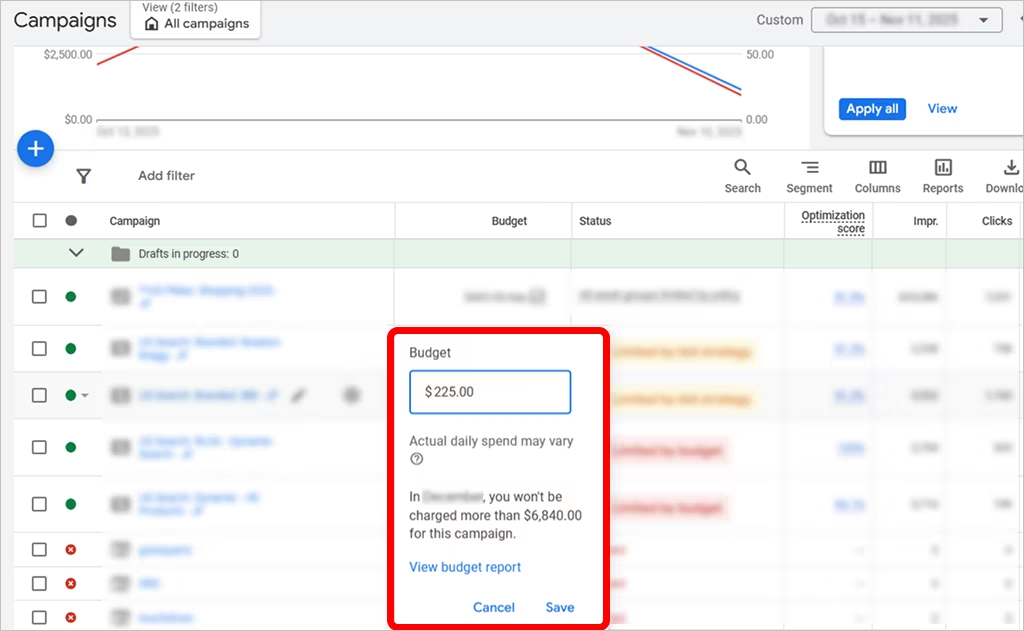
When you kick off a Google Ads campaign, you’ll be asked to set a daily ad budget. This is the average amount you want Google to spend per day.
Note: It doesn’t lock spending to that exact number each day. Some days you may spend a little more, some days less, depending on demand and opportunity.
The important thing is that Google Ads determine an average spend over the month. For example, a $30/day budget equals about $912 per month (based on Google’s 30.4-day monthly average).
If your ad budget is too low, your ads might not show often enough. Too high, and you may overspend before seeing results.
2. Understanding Google’s Spending Limits
As we said, Google doesn’t stick to your exact daily budget. On days with high search activity, it may spend up to DOUBLE your daily limit to catch more potential customers.
This is called overdelivery, and it can actually help you get better results during peak moments.
But Google still plays fair — your overall spend on Google Ads won’t exceed 30.4 × your daily average, which becomes your monthly cap. So if you set $25 per day, you’ll never spend more than about $760 a month.
Want full budget control? You can add account-level spending caps to make sure Google never goes beyond what you’re comfortable investing.
3. Estimating the Right Budget for Your Goals
Your ad spend should reflect your campaign objectives. Here’s how to set a budget:
- Start by defining what you want: more leads, more sales, or stronger visibility
- Look at typical CPC costs in your industry and the conversions needed to hit your ideal ROI
- Decide on a monthly budget that realistically supports those outcomes
Then use this simple formula to break it down:
Average Daily Budget = Monthly Budget ÷ 30.4
Example: A $1,000 monthly budget is about $33/day.
As results come in, keep adjusting. Increase spending when performance is strong, or refine your strategy when something needs improvement.
Cut Waste. Boost ROI.
Smart PPC management can increase conversions by 2–3× without raising ad spend.
Hidden or Additional Google Ads Costs to Consider
Your Google Ads spend isn’t the only expense to plan for. Many businesses also invest in management fees if they work with an agency or specialist to run and optimize their campaigns.
This often leads to stronger performance. Think about also budgeting for:
- Landing page design and development to improve conversions
- Ad creatives like copywriting, graphics, or video production
- Conversion tracking and ongoing A/B testing to fine-tune results
These additional investments directly impact how well your ads perform. The better these three elements, the more leads you get from every dollar you spend.
Want to speak with an expert?
Call us at (872) 242-1074
Close More Business with Your Google Ads Budget
Google Ads isn’t cheap, but when managed well, you could see a 200%+ ROI!
The key is PPC optimization: ongoing tweaks to your targeting, messaging, and bidding to make sure your budget is spent on valuable clicks.
Thankfully, you don’t need to become a Google Ads expert! With the right Google Ads management, you can get better-quality leads on budget.
Comrade Digital Marketing is here to help. Over 100 clients have seen excellent results from our SEO and PPC campaigns, yielding as much as an 800% return on investment.
Learn more about our PPC services, or if you’re ready to get started, book a free strategy call today.